Building a Visual Toolkit: Gaming Controller Collections
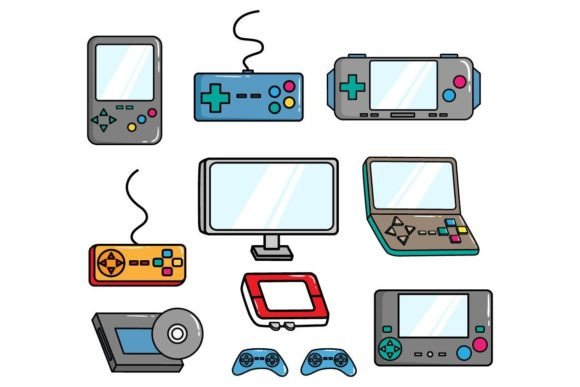
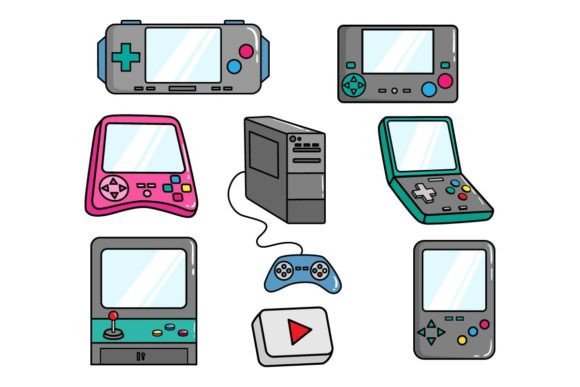
Whether you're a seasoned graphic designer, a marketing professional crafting a campaign, or a hobbyist designing a custom t-shirt, the need for crisp, scalable, versatile imagery is universal. This is where a specialized resource, like a Gaming Console or Gamepad Collection, becomes more than just pictures; it becomes a foundational tool in your creative arsenal. Such a collection, composed of 100 meticulously crafted vector files, is designed for immediate and professional application across a myriad of projects.
The Power of Vector Graphics in Creative Work
Unlike standard pixel-based images (like typical .JPG files), vectors are built from mathematical paths and points. This means they can be scaled to any size—from a tiny mobile app icon to a massive billboard print—without any loss of quality, pixelation, or blurring. The core strength of this particular pack is its compatibility. Provided in .Ai (Adobe Illustrator) and .EPS (a universal vector format compatible with Illustrator 10 and CorelDraw) files, it ensures seamless integration into your existing workflow. The included .JPG previews offer quick reference, while the vectors grant you complete editorial control.
Unlocking Creative Possibilities with Gamepad Assets
A collection of gaming controllers isn't merely a set of tech illustrations. It’s a symbolic toolkit representing interaction, technology, nostalgia, and modern culture. Each vector outline is a clean, editable starting point. Imagine deconstructing a classic gamepad: you can isolate the directional pad, the action buttons, or the overall silhouette. This allows for immense creative flexibility. You could create a minimalist logo for a tech startup by using just the controller’s distinctive shape, or build a complex, layered poster celebrating gaming history by combining elements from multiple console eras.
The inclusion of Color RGB values is a crucial practical detail. It ensures that the vibrant reds, blues, and yellows of iconic controllers remain consistent when you incorporate them into your digital designs, maintaining brand integrity or achieving specific aesthetic moods.
Practical Applications Across Professional Fields
The utility of this asset pack spans far beyond the gaming industry. Let’s explore how different professionals can adapt these vectors for their specific goals.
For marketers and bloggers, these graphics can elevate content. A vector controller can be used to create custom infographics about gaming trends, serve as eye-catching visual anchors in articles about technology interfaces, or be incorporated into social media campaign assets for a product launch targeting a tech-savvy audience. The scalability means the same graphic works perfectly for a Facebook post and a printed event brochure.
Educators and publishers can use these clear, recognizable illustrations in educational materials. Whether it’s a textbook section on the evolution of human-computer interaction, an online course module about hardware design, or a children’s book about technology (using simplified, colorful versions), vectors provide authoritative, reusable visuals.
Entrepreneurs and small business owners, especially in the e-commerce space, find immediate value. Custom merchandise is a booming market. These vectors can be the basis for unique t-shirt designs, laptop sticker sets, or poster art. Because you can edit every line and color, you can adapt a controller design to match your store’s specific aesthetic—making it retro, neon, monochrome, or fragmented—without needing to draw it from scratch.
Maintaining Clarity and Originality in Your Projects
With 100 different vectors at your disposal, the key to effective use is intentional selection and modification. Avoid simply placing a graphic as-is. Instead, consider your audience. For a corporate presentation, you might use a clean, single-color outline to represent "user input." For a vibrant community event poster, you might combine several colorful controllers in a dynamic composition.
To keep results organized and original, treat the pack as a component library. Isolate specific elements—like a row of buttons or a joystick—and combine them with your own typography, backgrounds, or other vector elements. This approach prevents your work from looking like a template and ensures it serves your unique communication goal. Consistency is achieved by applying a unified color palette (using the provided RGB values as a starting point) or a consistent line style across all the vectors you use in a single project.
From Inspiration to Finished Project
Here are concrete ideas to translate inspiration into a tangible outcome. A freelance designer might take a modern controller vector, simplify its form into ultra-thin lines, and use it as a recurring motif in a website design for a game developer. An event organizer could use vectors from different console generations to create a timeline graphic for a gaming convention's promotional materials, each era colored distinctly to aid visual comprehension.
For hobbyists and content creators, the applications are equally direct. Streamers can design custom channel badges or overlay elements using these graphics. Bloggers can create unique featured images for their posts, ensuring their visuals remain sharp and professional at any resolution. The ability to open these files in common software like Adobe Illustrator or CorelDraw means there’s no technical barrier to entry for those with basic design software skills.
Ultimately, a Gaming Console or Gamepad Collection in vector format provides a bridge between a recognizable cultural symbol and your specific creative needs. It offers efficiency, giving you a professionally drawn base to work from, and freedom, allowing you to reinterpret, customize, and apply it in ways that resonate with your project’s context and audience. By focusing on how these scalable assets can solve real design problems—from needing a crisp logo element to creating expansive promotional artwork—you leverage them not as mere decorations, but as essential tools for effective visual communication.